- Home
-
Northwestern Medicine News
- July 2024
-
June 2024
>
- New Skin and Soft Tissue Infection Guidance, Rapid Infusion Protocol for Select Oncology Medications and Clinical Guideline for the Management of Metabolic Acidosis in Mechanical Circulatory Support From ADSP
- Addiction Medicine Consult Service and Other Substance Abuse Initiatives Expand Across NM
- New Ambulatory Surgical Center Opens in River North
- David N. Zull, MD, Receives Mecklenburg Award
- Epic Urgent Care Module Enhances Clinician Workflows
- Patients Can Now Get Care Recommendations Through the MyNM Self-Triage Tool
- Prepare for International Travel With the NM Travel Medicine Program
- May 2024
-
April 2024
>
- A Message to Physicians from Dr. Chrisman
-
Physicians Celebrate Doctors Day by Recognizing Peers
>
- Physicians Celebrate Doctors Day CDH
- Physicians Celebrate Doctors Day Delnor
- Physicians Celebrate Doctors Day Kishwaukee
- Physicians Celebrate Doctors Day Lake Forest
- Physicians Celebrate Doctors Day McGaw
- Physicians Celebrate Doctors Day NWR
- Physicians Celebrate Doctors Day ICC
- Physicians Celebrate Doctors Day NMH
- Physicians Celebrate Doctors Day Palos
- March 2024 >
-
February 2024
>
- Complete the 2024 Joint Affiliate Annual Disclosure Survey
- Capture a More Accurate Smoking History by Documenting Cigarette Use Over Time
- Attend an Open House to Learn More About Qventus Platform for OR Availability
- Be Alert to Scams Targeting Physicians
- Patrick M. McCarthy, MD, Contributes to New National Guideline Issued by AHA and ACC
- Orland Park Radiation Oncology Now Open
- 9 Physicians Join RMG Radiation Oncology in West Suburbs
- U.S. News & World Report Voting Opens Soon 2024
-
January 2024
>
- IT Systems at Lurie Childrens for Physicians
- January 2024
- Annual Laser Safety Training
- Activity/Positioning with Mobility and PT/OT Eval & Treat Order Enhancements
- Prior Authorization
- How Physicians Can Participate In or Start an IGNITE Group
- Clinical Team Improves ED Care for Patients With Opioid Use Disorders
- Oak Brook Outpatient Center Now Open
- Counterfeit Ozempic Causing Hypoglycemia May Be in Local Area
- ‘Hello, World’: Bringing Advanced Technologies to Fruition
- Qventus Platform for OR Availability Goes Live at Surgery Locations April 2
- Qgenda Web Access Will Require NM Login
-
December 2023
>
- New Systemwide Lipid Rescue Protocol, and Participate in the Mandatory Flu Vaccination by December 31
- Congratulations to Physicians Recognized With Honors
- CDH Chief Medical Officer Kevin Most, DO, Retires This Month
- Sex Designation ‘X’ Now Live in Epic
- Read About 5 Ways NM Impacted the Community in 2023
- Qgenda Web Access Will Require NM Login
- Holiday Greeting 2023
- Todd Barrowclift, DO, Appointed CMO of Palos Hospital, and Other Leadership Updates
- Epic SlicerDicer Access Expanded Across NM
-
November 2023
>
- New Opioid Treatment Program Reporting Feature on ILPMP, Aerosol-Generating Procedure List Updated, and Flu Vaccination Deadline Extended to December 31
- From Inception to Evolution of Palliative Medicine With Martha L. Twaddle, MD
- NM Pioneers Innovative Approach to CGM Data in Epic
- Epic Workflow Enhancements Go Live November 29 With Hyperdrive
- NM Physicians Discuss Health Equity in Recent NU Department of Medicine Grand Rounds
- Notice of Medications Removed From System Formulary
- DEA Extends COVID-19 Telemedicine Flexibilities for Prescription of Controlled Medications, and Participate in the Mandatory Flu Vaccination Campaign by December 1
- New Outpatient Center Now Open in Old Irving Park
- NM Doximity Contract Ends December 1
- Clinical Team Work With Workforce Health & Safety to Raise Awareness of Blood and Body Fluid Exposures in the OR
- Updates Coming to Legal Sex and Sex Assigned at Birth Fields in Epic
- Magnificent Mile Lights Festival
-
October 2023
>
- NM Aid Gaza
- Potential Pharmacy Walkout Could Impact Ability to Get Prescriptions and Vaccines at Walgreens
- Epic Workflow Enhancements Go Live at LFH, Marianjoy, Grayslake and Ambulatory Clinics October 29
- One-Step Medications to Require Cosign Beginning October 31
- New Improved Resources to Support Health Literacy
- A Mission to Improve Breast Cancer Screening and Diagnosis
- Respiratory Virus Update; System P&T Committee Updates
- Clinical Update - New System Policy for Patients Who Limit or Decline Blood Products
- Claudia Tellez, MD, Leads Hispanic Breast Cancer Clinic
- Required Annual Safety and Integrity Training Opens Monday
- Participate in the Mandatory Flu Vaccination Campaign by December 1
- Feinberg Office of CME Can Now Report CME Credits for ABS Members
- Fall 2023 Engagement Survey
-
September 2023
>
- AUM List of Medications
- Enhancements to NM Benefits for employed physicians
- Clinical Update - September 28, 2023
- Dinee Simpson, MD, Named NM Chief Health Equity Executive
- Perioperative Guidance on GLP-1 Agonists
- Ophthalmologist Robert S. Feder, MD, Receives 2023 Mecklenburg Award
- Broad-Based Effort Delivers Better Patient Blood Management
- Clinical Update - Flu Vaccine Campaign
- Diane B. Wayne, MD, Is New CMO of NMH
- Review Process and Policy Updates for NM Immediate Care Centers
- Resources to Support Physician Mental Health
- Complete Annual Training Requirements for Maternal Hypertension and OB Hemorrhage
-
August 2023
>
- Daniela Ladner, MD, Leads Transplant Research and Innovation at NM
- What You Need to Know About the New Alzheimer’s Drug Leqembi
- Five Stories to Know From FY23
- How to Update Your “Find a Doctor” Profile on nm.org
- New EAP Goes Live Tomorrow
- Larissa R. Pavone, MD, Leads PM&R Residency Program at Marianjoy Rehabilitation
- Learn More About How AI Supports Imaging
- What Physicians Need to Know About NM's New EAP Vendor
- NM-Q Medical Device Studio
- New Patient Education Materials Prioritize Health Equity
- R. Chris Bowen, MD, Leads Ocular Oncology Service
- New Interpretation Services Platform Now Available Systemwide
- Northwestern Medicine Hospitals and Specialties Recognized by U.S. News & World Report
-
July 2023
>
- New Policies and Guidelines From System Pharmacy & Therapeutics
- Joshua Hauser, MD, Teaches Medical Students the Value of Teamwork
- Spotlight on Huntley Hospital
- RFID Technology Helps NM Manage Key Supplies
- Lollapalooza Music Festival to Impact Traffic Downtown
- Amber N. Watters, MD, Leads Physician-Driven Design of New Obstetrics App
- Check Your ILPMP Account for Suspicious Activity
- Patrick M. McCarthy, MD, Leads Trial of Mitral Valve Repair Method
- Susan E. Quaggin, MD, Named Chief of Medicine
-
June 2023
>
- Use of Remdesivir for Treatment of COVID-19, Plus New Guidance on the Use of SGLT2 and Dose Rounding for Cytotoxic and Biologic Agents
- An Update for Physicians From Dr. Chrisman
- License Renewal Training and Deadlines
- Epic Updates Impacting Clinical Practice
- Oncology Clinicians Sought for Input on Telehealth Program
- Andrew Oleksyn, DO, Featured on Good Morning America
- New System Pharmacy & Therapeutics Site on NMI
- New Transfer Center Module Now Live in Epic
- Updated Aerosol Generating Procedures and PPE Guidelines and Updated Fingernail Grooming and Apparel Policies for Clinical Settings
- Jeremiah Placido, MD, Appointed Chief Medical Officer of Kishwaukee and Valley West Hospitals
- Immediate Care Centers Leverage Innovative Solutions to Enhance Patient Care
- Kush R. Desai, MD, Leads Clinical Trial of New Stent for IVC Occlusion
- Reminder: More Patients Now Eligible for Lung Cancer Screening
- Sexual Harassment Training Required for Physicians Practicing or Supervising Employees in Chicago
- Prescribers of Controlled Substances Must Register With Illinois Program
- What Physicians Need to Know About Illinois License Renewals
-
May 2023
>
- Hospital Pain Management Policy Is Aligned to Support Clinical Best Practices
- P2P Network Expands to APPs and Nurses, Plus Scholars of Wellness Is Now Accepting Applications for AMC FY24
- NM Gastroenterology Department Leads in Global Health Education
- Why You Do What You Do: Lee A. Lindquist, MD
- Medicaid Redetermination Renewal Will Impact Some Patients; New Presurgical Antibiotic Guidance for Patients With Non-anaphylactic Penicillin Allergy
- Be Aware of Current DEA Scam Targeting Physicians and APPs
- Apply for Funding for Innovative Ideas or Participate in a Program to Grow Innovative Solutions
- NASCAR Street Race May Impact Travel Downtown
- AAPI Heritage Month: NM Champion Network Members Reflect on Community
- Learn About New Privacy and Security Standards for Independent and Personal Websites
- Mental Health Credentialing Changes for Physicians
- Momen Wahidi, MD, Becomes Medical Director of Canning Thoracic Institute and Health System Director of Interventional Pulmonology
- DEA Extends COVID-19 Telemedicine Flexibilities for Prescription of Controlled Medicines; Assist With the Timely Completion of Death Certificates
- Clinical Update - Public Health Emergency Ending Impacts Telehealth, Medicare 3-Day Stay Waiver for SNF and Government Credentialing, Changes Simplify Use of Bivalent mRNA COVID-19 Vaccines
- Key Takeaways of OTC Narcan for Physicians
- Systemwide Initiative Launches to Improve Diagnosis and Treatment of Urinary Tract Infections
- New Systemwide Guidelines for the Acute Management of Hyperkalemia
-
April 2023
>
- Culture of Safety Survey Deadline Extended to May 5
- FDA Advises Against Halyard N95 Respirator Use
- New COVID-19 Masking and Eye Protection Guidelines, and Revised Hospital Visiting Hours
- Eugene F. Yen, MD, Leads Gastroenterology in North and Northwest Suburbs
- New Federal DEA Training Requirement: What You Need to Know
- Update on Pain Management Committee Initiatives
- Aleksandra Gmurcyzk, MD, Donates Kidney and Starts a Chain That Saves 2 Lives
- Culture of Safety Survey Is Now Open
- Potential Strike May Impact Shuttle Bus Service Downtown
-
March 2023
>
- COVID-19 Testing Requirement for Procedures is Being Discontinued and Updated Eye Protection Guidelines
- Celebrate Doctors’ Day 2023
- Expertise and Teamwork at Delnor Save a Life After a Rare Trauma
- Attend the MacEachern Symposium on April 19
- Public Elevator Access Restrictions at NMH
- Kennedy Expressway Construction Project Begins March 20
- Why You Do What You Do: Micah J. Eimer, MD
- Physician and Leader Q&A: Submit Your Questions for Dr. Chrisman
- NM Successfully Performs Double-lung Transplant on Second Patient With Stage 4 Lung Cancer
- Outpatient Infusion Center at Palos Plans Expansion
- Clinical Update - Ischemic Stroke Protocols Go Live at the End of March
- New Committee to Drive NM Development of Augmented Intelligence Solutions
- Roxanna Garcia, MD, MS, Offers Specialized Neurocritical Care Services at Palos
- New Facility Updates: Center for Pain and Spine Health Bloomingdale, and Winfield Town Center Medical Office Building
- Watch for Fraudulent Text Messages
-
February 2023
>
- Clinical Update - Interruptive Epic Alerts Reduced to Decrease Alert Fatigue, Antimicrobial and Diagnostic Stewardship Program Upgrades Website
- Northwestern Medicine Brings ECMO Training Program to Community Hospitals
- NM Champion Network Members Improve Experiences for Black Patients
- U.S. News & World Report Voting Now Open
- Annual Laser Safety Training for Physician Laser Users
-
January 2023
>
- Clinical Update - Tenecteplase to Replace Alteplase in the Treatment of Acute Ischemic Stroke, New Standardized Guidelines for Managing Inpatients With Insulin Pumps
- Q&A With Howard Chrisman, MD, Incoming CEO and President of NMHC
- Justin Boike, MD, Sean Koppe, MD, and Team of NM Physicians Bring Expanded Liver Transplant Care to CDH
- U.S. News & World Report Voting Opens Soon
- Privacy Monitoring Expanded to Enterprise PACS System
- Epic Lumens Go-Live Is February 1
- New NM Hospital Standardizations for Blood Pressure Cuffs, Inpatient Insulin Pump Use Underway
- A. Samad Soudagar, MD, Brings Advanced Interventional Gastroenterology Services to McHenry
- Irene Blanco, MD, Leads Diversification in Rheumatology
- Improvements in Epic and Training for Advance Care Planning Now Available
- New DEA Scam Targets Physicians
-
December 2022
>
- Clinical Update - Pre-Procedure COVID-19 Testing Protocol and Changes to NM Daily Symptom Check
- Sharif A. Halim, MD, Leads Structural Heart Disease Program at Palos
- NM Response to Pulmonary Embolism Is a ‘Tremendous Medical Collaboration’
- New Sycamore Behavioral Health
- Congratulations to Physicians Recognized With Honors
- Pre-Med Summer Internship
- Clinical Update - NM Discontinues Administration of Bebtelovimab and Evusheld, and Oseltamivir (Tamiflu) Availability Update
- Christopher J. Berry, MD, Performs First CardioMEMS Implant at Kishwaukee Hospital
- NM Completes its Transition to MS Teams for Telehealth
- Renovated Outpatient Clinic in Evanston Reopens
- Outpatient Rehabilitation Services Expanding North
-
November 2022
>
- Get Your Flu Shot
- Ankit Bharat, MD, Satish Nadig, MD, PhD, and Rade Tomic, MD, Perform Northwestern Medicine’s First Successful Lung-Liver Transplant on a Former NMH Nurse
- MyNM Paperless Billing
- Philippines Mission Trip
- Winter 2022 Engagement Survey
- Benjamin Bryner, MD, and Duc Thinh Pham, MD, Perform First ‘Heart in a Box’ Transplant in Illinois
- Urologist Anthony Schaeffer, MD, and Infectious Disease Specialists Janna Williams, MD, and Teresa Zembower, MD, Offer Complete Care for Patients With Complex Urologic Infections
- Dean P. Shoener, MD, Leads the Expansion of General Surgery at Delnor Hospital
- Personal Experience Leads Tokoya Williams, MD, to Join NM Team
-
October 2022
>
- Howard B. Chrisman, MD, to Become President and CEO of NMHC, and Other Leadership Changes
- Leo I. Gordon, MD, Honored with Prestigious Gary A. Mecklenburg Distinguished Physician Award
- Dr. Ison Leaving NM for Prestigious Position at National Institutes of Health
- All of Us Research Program Is Actively Recruiting Participants
- Universal Masking Remains in Place for All Clinical Areas Across NM
- Douglas R. Johnston, MD, Joins NM from Cleveland Clinic as Surgical Director of Bluhm Cardiovascular Institute at NMH
- CME Requirements for Illinois License Renewal and Annual Safety and Integrity Training
- Q&A With Thomas McAfee, President of Northwestern Memorial Hospital
- Open Enrollments Begins October 19 for All NM Employed Physicians and Advanced Practice Providers
- Lung Cancer Screening Program Clinical Update
- Chicago Marathon Will Impact Traffic This Weekend
- All of Us Research Program Is Actively Recruiting Participants
-
September 2022
>
- Meet Critical Care Medicine Physician Laeeq Syed Shamsuddin, MD
- Driver Rehabilitation Programs Help Older Adults and People With Disabilities Adapt to the Road
- NM’s Three Advanced Practice Provider Directors and Growing Leadership Teams Are Charting the Course for a Bright Future
- Chicago Water Main Replacement
- COVID-19 Update Omicron Booster
- Meet Satish N. Nadig, MD, PhD, Director of the Comprehensive Transplant Center
- Rod S. Passman, MD, Leads Study of Digital-Assisted Personalized Medicine for Atrial Fibrillation
- Meet Marsha Oberrieder
- Apply for $250,000 in Grant Funds for Patient Safety Improvements by September 30
- Q&A With Anne Hubling, President and Chief Nurse Executive of Marianjoy
- Advance Care Planning Standardization at NM
- Micah J. Eimer, MD, Leads the Renowned NM Summer Pre-Med Internship Program
- How to Report Biased Behavior and Discrimination
- New Contact Information for Corporate Insurance goes into effect September 1
- Submit a Process Improvement Project by September 2
- Update Your Home Address in PeopleSoft
- Epic Downtime Planned For September 11
-
August 2022
>
- Meet Julie E. Witkowski, MD, Medical Director of the Brain Injury Rehabilitation Program at Marianjoy
- Epic-Integrated Teams Telehealth Platform Now Available
- Christopher George, MD, and Jeffrey Wayne, MD, Lead Development of the New NM Cancer Center Orland Park
- Complex Case: Cross-system Clinical Collaboration Expedites Care for a Life-threatening Spinal Injury
- David Mochel, MD, Finds New Perspective Through NM Champion Network
- Q&A With Ken Hedley, New President of CDH
- NM Research Roundup: Dissolving Implantable Device Relieves Pain Without Medications
-
July 2022
>
- Northwestern Medicine Hospitals are Named Among America's Best
- NM to Offer COVID19 Vaccination to Inpatients and COVID19 Vaccination for Children Ages 6 Months to 4 Years Now Available
- Pain Management Resources Enhanced and Made More Accessible
- LFH Team Exemplifies Better in Response to Highland Park Tragedy
- The Clinic of the Future Aims to Transform the Patient and Physician Experience
- A Quinn Family Affair Father Son and Daughter Serve as Physicians at Palos Hospital
- Recent Tragedy in Highland Park
- Parambir Dulai, MD, to Lead Hyperbaric Oxygen Therapy Study for Ulcerative Colitis
- After Roe: What NM Clinicians Should Know About the Impact in Illinois
- NM Oncology Expands Access to Cancer Care in South Suburbs
- John E. Pandolfino, MD, Leads Development of the New NM GERD Online Assessment Tool
-
June 2022
>
- NM Unveils Plans for State-of-the-Art Outpatient Center in Bronzeville
- Updating Cell Phone Number and Emergency Alert Areas
- Clinical Update - June 24, 2022
- Mansueto Innovation Institute Opens New Space and Launches Programs to Transform Healthcare Challenges Into Solutions
- Hyperbaric Oxygen Therapy Study
- Your Monkeypox Questions Answered
- Clinical Update - June 9, 2022
- Gaurava Agarwal, MD, Becomes 1st NM Chief Wellness Executive
- Ankit Bharat, MD, and Rafael Garza-Castillon, MD, Perform Historic ‘Lungs in a Box’ Transplant
- New Look for Epic Results Review Available June 28
- Alexander Lin, MD, an RMG Medical Director at Palos, Takes Passion for Women’s Health Care Around the World
- Register Now for the NM Women Physicians Networking Event
- Important Updates for Physicians
- A Planned Epic Downtime Will Occur June 12
- Policy Updates for the Use of Handheld Point-of-Care Ultrasound Devices
-
May 2022
>
- Rajesh N. Keswani, MD, and John E. Pandolfino, MD, Are Advancing the Use of Artificial Intelligence in Gastrointestinal Care
- Improved Epic Support Service Provides Priority Help for Physicians and APPs
- Social Determinants of Health Assessment Launches Next Week in Primary Care Clinics
- NM Physicians Bring Better Medicine to Chicago’s Championship Sports Teams
- Culture of Safety Survey Launches May 24
- Use EAP Services
- Michael I. Peters, MD, Leads Collaboration Between EMS and ED to Benefit Patient Outcomes
- Alert: Iodinate Contrast Agent Shortage
- Grazia Aleppo, MD, Leads Successful Team-Based Approach to High-Risk Diabetes
- Dmitry Pyatetsky, MD, and Julia Pyatetsky, RN, Organize NICU Blankets Donation for Newborn Twins in Ukraine
- Attend NM Spring Town Halls
- Physician Scam Alert
-
April 2022
>
- Saadia S. Sherwani, MD, MS, Becomes NMH Chief Medical Officer
- Samer Attar MD Brings Better to Ukraine
- A. Samad Soudagar, MD, Leads Endoscopy Expansion at LFH and McHenry
- Download the New Mobile App for Employees and Physicians Today
- New Workplace Violence Training Now Required for Employed Physicians and Staff Who Interact With Patients and Visitors
- Robin Cohen, MD, Leads New Cancer Rehabilitation Clinic at Marianjoy
- Craig M. Horbinski, MD, PhD, Breaks Down a Groundbreaking Diagnostic Tool Now Available at NM
- NMH and CDH Physicians Collaborate On a New Program that Helps Liver Transplant Patients Achieve Sobriety
- Implicit Bias Training
-
March 2022
>
- Study Reveals Response to Exercise is Key to Device Therapy for Patients with HFpEF
- NM Hosts Systemwide Doctors' Day Celebrations
- Sachin Patel, MD, PhD, Is the New Chair of Psychiatry and Behavioral Services
- Ankit Bharat, MD, Young Kwang Chae, MD, and the NM Transplant Team Collaborate on NM’s First Double-Lung Transplant in a Patient with Terminal Cancer
- Result Management Key Initiative Relaunches Adrenal Model
- NM to Host Women in Medicine Conference
- Sophia Korovaichuk, MD, Peter A. Lechman, MD, and Vitaliy Y. Poylin, MD, Rally NM Community to Support Ukraine
- Strategies for Navigating Difficult COVID-19 Conversations
- Better is Everywhere
- New Engagement Survey Launches March 22
- Transplant Surgeons Perform First Robot-Assisted Living Donor Nephrectomy at NM
- Christopher K. Mehta, MD, Leads Life-Saving Code Aorta Program
- Complete Annual Laser Safety Training
-
February 2022
>
- Landmark Gift to Establish Northwestern Medicine Bluhm Heart Hospital
- Dimitri Kraince, MD, Leads Neurosciences Expansion Across NM
- Khalilah L. Gates, MD, Michelle L. Prickett, MD, and Susan R. Russell, MD, Host New NM Get Better Podcast
- Group O Red Blood Cells and Cryoprecipitate Supply Update
- NM Ambulatory Growth Continues With 3 New Locations
- National Wear Red Day
- U.S. News and World Report Voting Opens Soon
- New Hepatic Artery Infusion Pump Now Available at NM
- Action Required to Keep Your Paging Services
- U.S. News and World Report Voting Now Open
-
January 2022
>
- Gaurava Agarwal, MD, Provides Advice and Resources to Help Manage Pandemic Stress and Burnout
- Documenting Cancer Stages in Epic Improves Care Quality
- Jonathan Rich, MD, and Ankit Bharat, MD, Perform First Heart, Double-Lung Transplant at NM
- Severe Group O RBC Shortage
- NM Physicians Lead Development of Online Symptom Checker
-
December 2021
>
- Best Wishes This Holiday Season
- New Pre-visit Questionnaires Enhance Patient Care and Optimize Clinic Workflow
- RMG Opens New Urology Clinic in West Region
- Nicholas J. Volpe, MD, Expands Eye Care to More Outpatient Sites
- New Licensure Requirement
- Northwestern University Health Services Is Now Part of Northwestern Medicine
- New Visage Ease App Provides Easy Access to PACS Imaging Studies
- Ankit Bharat, MD, Writes of “Innovation Amid Despair” During the COVID-19 Pandemic
- Dr. Bharat Leads the New NM Canning Thoracic Institute
-
November 2021
>
- Dr. Krainc Spearheads the New NM Neurogenetic Program
- Social Determinants of Health Assessment Launches in Inpatient Areas
- NM Adopts New PET Agent for More Accurate Prostate Cancer Tests
- Community Spotlight: NM Physicians Lead New Emergency Preparedness Initiative
- New Cardiac Technologies in West and Northwest Regions
- October 2021 >
-
September 2021
>
- Shortage of Blood Collection Tubes
- P2P Network Expands to North and West Regions
- New Evacuation and Shelter-in-Place Training Required by December 3
- Eye Protection Is Being Standardized At NM
- Engagement Survey Opens September 14
- Culture of Safety Survey Feedback Overview
- New Patient Survey Platform Now Live Across NM
-
July 2021
>
- NM Hospitals Achieve National, Regional and State Recognition in U.S. News & World Report Rankings
- Team-Based Approach Streamlines Spine Care at NMH
- Thomas Moran, MD, CMO of Palos Hospital and Other South Region Leadership Changes
- Minimally Invasive Treatment for Severe Abdominal Aortic Aneurysm Now Available at CDH
- Innovative Primary Care Clinic Opens in Naperville
- First NM Ambulatory Site Opens in South Region
- Modernized Nursing Units Open at McHenry
- New Physician Website Launches
- NM Transitions From Medline to Cardinal Health
-
May 2021
>
- Grand Rounds Event Highlights Health Equity
- Social Determinants of Health Pilot Project Goes Live
- Medallia Patient Satisfaction Survey Goes Live
- Complete the Safety Culture Survey by June 2
- After COVID-19 Discharge, Return to Hospital Is Common
- Behind Better: The NM Lung Transplant Team
- ICCs Successfully Reduce Antibiotic Use for Viral Illnesses
-
March 2021
>
- NM Celebrates National Doctors’ Day March 30
- Improved Patient Transparency Begins March 30
- Engagement Survey Recap and Next Survey Dates
- Patient Bias Policy Lays Foundation for Further Support
- NM Invests in Facility Upgrades and Service Expansions in West Region
- Spotlight on Northwestern Medicine International Health
- February 2021 >
- January 2021 >
- November 2020 >
-
September 2020
>
- Annual Flu Vaccination Campaign Begins
- NM Discontinues Use of Lead Aprons
- RMG Neurosurgeon Peter Lee, MD, Performs NM’s First Endoscopic Discectomy
- Lake Forest Hospital First in State to Offer Needle-Free Blood Draws
- Pilot of Improved CPR Training Program Is Under Way
- Epic Downtime Scheduled for Sunday, September 13
-
July 2020
>
- Dr. Simon Leads Northwestern’s Center for Health Equity Transformation
- Physician-Led Initiative to Improve Delayed Results in Diagnostic Imaging Goes Live in November
- Introducing NM’s First Sleep Surgeon – Michael Awad, MD
- Physician Perspective: The Future of Telehealth
- BCVI at CDH Completes 200th TAVR
- Northwestern Medicine Among America’s Best Hospitals
- Team NM Volunteers Bring Food and Supplies to Bronzeville Residents
- May 2020 >
- April 2020 >
- March 2020 >
-
January 2020
>
- New Physician Experience Survey Launches February 11
- U.S. News and World Report Voting Now Open
- Fitness for Duty: Recreational Cannabis
- Vocera Enhancements Improve Experience
- Review of Surgical Videos Aims to Improve Quality, Collaboration
- NMG Plastic Surgeon Leads Launch of Gender Pathways Program
- Redesigned Physician Profiles Now Live on NM.org
- MyNMI, IS and MyHR Move to a Single Service Portal January 30
-
November 2019
>
- Vaping-Related Lung Injury: What You Need to Know
- NMH ED Physician Extends the Reach of Disaster Relief
- NMG Physician Leader Launches Well-being Program
- Women in Medicine Symposium Attracts Over 400
- Orthopaedic Surgeon Leads Opioid Dosing Guidelines for NM
- HSCCs Improve Quality, Safety and Care Alignment
- Complete Annual Safety and Integrity Training by December 2
-
September 2019
>
- On the Front Lines in El Paso and Dayton
- Get Your Flu Shot By December 1
- New Illinois Licensing Requirements
- Meet the New CMO in Qatar: Riad AbdelKarim, MD, MS
- New Technology Automates Supply Management at LFH
- CDH Among First to Deploy Robotic Technology Targeting Lung Cancer
- NM Quality Measures Available Online
-
July 2019
>
- Ask the Expert Q&A: What You Need to Know About Marijuana Legalization
- The Road to Greatness: A Page From the BCVI Playbook
- Physician Burnout: Organizations Must Change
- Katherine Tynus, MD, on Affecting Change in Organized Medicine
- Dr. Abecassis Named Dean of University of Arizona College of Medicine – Tuscon
- Secure Data on USBs
- Office of Research Expands Access to Systemwide
- May 2019 >
- March 2019 >
-
January 2019
>
- U.S. News and World Report Voting Opens Soon
- Annual Safety and Integrity Training Extension
- Secure Texting for Providers Launches January 28
- From Translation to Transplant
- Urology Program Receives $10M Gift
- MyNM Mobile App Now Available
- Congratulations to All Northwestern Medicine Top Doctors!
- Online Physician Transparency Reporting Now Systemwide
- November 2018 >
-
Physicians You Need to Know
- March 2022 >
- February 2022 >
- January 2022 >
- December 2021 >
- November 2021 >
- October 2021 >
- September 2021 >
- July 2021 >
- May 2021 >
- March 2021 >
- January 2021 >
- November 2020 >
- September 2020 >
- March 2020 >
- January 2020 >
- November 2019 >
- September 2019 >
- May 2019 >
- March 2019 >
- January 2019 >
- November 2019 >
- Licensure and Regulatory Requirements
-
Clinical Notes and Notices
- Community Connect
- Feinberg School of Medicine News
-
Research and Breakthroughs
- CME Opportunities
-
Honors and Recognitions
- Events
- Physician Resources
Use Correct Remote Portal to Streamline Access to NMI
March 25, 2021 | 1 min. to read
Northwestern Medicine has improved access to NM Interactive from a mobile device or a laptop for employees and physicians who log in from locations off-campus. The old portal access.nmh.org automatically redirects to the URL remote.nm.org to enable easy access to your favorite pages and applications, such as web versions of Outlook and Microsoft Teams, without an additional sign-in step. If you use Citrix to connect to Epic or other clinical applications, you may also need to update to the latest version of Citrix here.
Take the following steps to access NMI when you are off campus:
1. Enter remote.nm.org into your browser, or visit the Employee and Physician Login page on nm.org and click “Employees and Physicians” under remote log-in links.
2. Enter your email address or your [email protected] in the log-in window and click Next.
Take the following steps to access NMI when you are off campus:
1. Enter remote.nm.org into your browser, or visit the Employee and Physician Login page on nm.org and click “Employees and Physicians” under remote log-in links.
2. Enter your email address or your [email protected] in the log-in window and click Next.
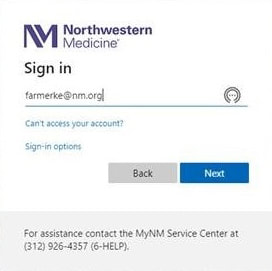
3. Enter password and click Next.
4. Enter your multifactor authenticator number. If you have not setup your multifactor authentication options, you will be redirected to the enrollment portal to set up Microsoft Authenticator app.
4. Enter your multifactor authenticator number. If you have not setup your multifactor authentication options, you will be redirected to the enrollment portal to set up Microsoft Authenticator app.
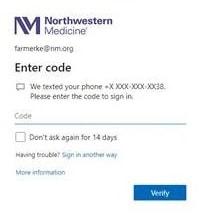
5. Click Verify.
6. You will land on the NMI home page.
Update bookmarks and favorites to the new address remote.nm.org.
If you have questions, contact MyNM Service Center at 312.926.HELP (4357).
6. You will land on the NMI home page.
Update bookmarks and favorites to the new address remote.nm.org.
If you have questions, contact MyNM Service Center at 312.926.HELP (4357).
CLINICAL UPDATE
July 25: New and Revised Clinical Guidelines and System Protocols From System P&T Committee
July 25: New and Revised Clinical Guidelines and System Protocols From System P&T Committee
PHYSICIAN RESOURCES
Regional CMOs and CNEs
Physician Well-Being
Welcome New Physicians
Licensure & Regulatory Requirements
Clinical and Informatics
Antimicrobial and Diagnostic Stewardship
Epic Enterprise Training NMI
System Collaboratives NMI
System Pharmacy & Therapeutics NMI
Medication Access Guide
Vocera Resources
QGenda Resources
Clinical and Informatics
Multimedia
Better Edge Podcasts
Breakthroughs Podcasts
Inside the OR Videos
NM in the News
Regional CMOs and CNEs
Physician Well-Being
Welcome New Physicians
Licensure & Regulatory Requirements
Clinical and Informatics
Antimicrobial and Diagnostic Stewardship
Epic Enterprise Training NMI
System Collaboratives NMI
System Pharmacy & Therapeutics NMI
Medication Access Guide
Vocera Resources
QGenda Resources
Clinical and Informatics
Multimedia
Better Edge Podcasts
Breakthroughs Podcasts
Inside the OR Videos
NM in the News






© 2024 by Northwestern Medicine® and Northwestern Memorial HealthCare. Northwestern Medicine® is a trademark of Northwestern Memorial HealthCare.

|
Northwestern Memorial
312.926.2000 |
Central DuPage
630.933.1600 |
Lake Forest
847.234.5600 |
Delnor
630.208.3000 |
Kishwaukee
815.756.1521 |
Valley West
815.786.8484 |
Marianjoy
630.909.8000 |
|
©2024 by Northwestern Medicine® and Northwestern Memorial HealthCare. Northwestern Medicine® is a trademark of Northwestern Memorial HealthCare, used by Northwestern University.
|
|