Epic and Informatics Update
July 28, 2020 | 5 min. to read
The Next Epic Release is Tuesday, September 29
Systemwide change
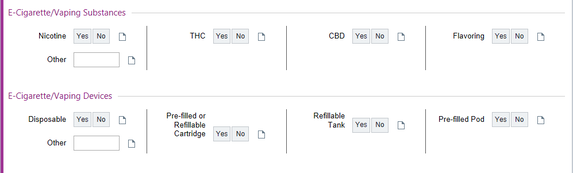
E-cigarette and vaping substance and device types now located within the history section. The following fields have been added:
Systemwide change
E-cigarette and vaping substance and device types now located within the history section. The following fields have been added:
Ambulatory change
Intelligent Medical Objects (IMO) Clinical Interface Terminology is a suite of vocabulary products that allows clinicians to document diagnoses within Epic using familiar words and phrases. The next update will be installed in Epic on Thursday, October 1, and may result in some diagnoses becoming inactive. View this tip sheet to learn how to replace a diagnosis and re-associate signed orders
Intelligent Medical Objects (IMO) Clinical Interface Terminology is a suite of vocabulary products that allows clinicians to document diagnoses within Epic using familiar words and phrases. The next update will be installed in Epic on Thursday, October 1, and may result in some diagnoses becoming inactive. View this tip sheet to learn how to replace a diagnosis and re-associate signed orders
Inpatient change
Pain management update to pediatric admission and post-op ENT order sets
Acetaminophen and ibuprofen orders have been modified to enable providers to select acetaminophen or ibuprofen as first- or second-line medications to manage pain. Correct administration instructions will show for each.
Pain management update to pediatric admission and post-op ENT order sets
Acetaminophen and ibuprofen orders have been modified to enable providers to select acetaminophen or ibuprofen as first- or second-line medications to manage pain. Correct administration instructions will show for each.

Other Epic updates:
Use the Opiate 90 Day SmartSet for Correct Dosage
The Opiate 90 Day SmartSet in Epic is designed to order three consecutive one-month prescriptions, keeping only one active on the medication list at a time. Use this when prescribing or renewing chronic opioid medications in order to get more accurate morphine equivalent daily dose (MEDD) calculations.
MEDD is an important tool for defining opioid prescribing risk, but it is only as good as the information entered into Epic. The MEDD will not calculate unless ordering the medication discretely (not free text).
When prescribing more than one month of medication at a time, the start and end dates need to be consecutive so that the calculator can recognize and account for the overlap. Otherwise, it will view those prescriptions as concurrent.
The Opiate 90 Day SmartSet orders the medications discretely and consecutively, including the quantity, as shown below:
Use the Opiate 90 Day SmartSet for Correct Dosage
The Opiate 90 Day SmartSet in Epic is designed to order three consecutive one-month prescriptions, keeping only one active on the medication list at a time. Use this when prescribing or renewing chronic opioid medications in order to get more accurate morphine equivalent daily dose (MEDD) calculations.
MEDD is an important tool for defining opioid prescribing risk, but it is only as good as the information entered into Epic. The MEDD will not calculate unless ordering the medication discretely (not free text).
When prescribing more than one month of medication at a time, the start and end dates need to be consecutive so that the calculator can recognize and account for the overlap. Otherwise, it will view those prescriptions as concurrent.
The Opiate 90 Day SmartSet orders the medications discretely and consecutively, including the quantity, as shown below:
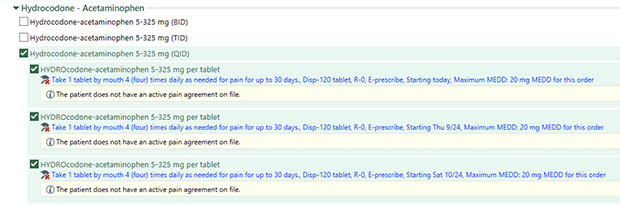
Please note that if you adjust the dose, everything else stays the same in the script, but you have to adjust all three in the series.
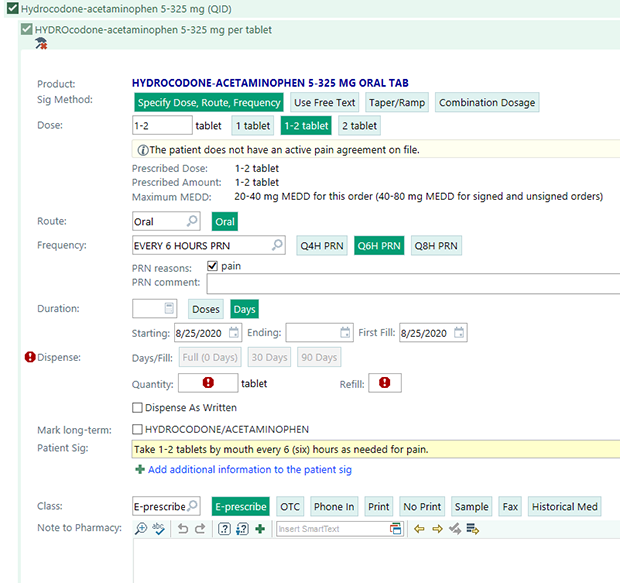
And, if you adjust the frequency, you will need to re-enter the duration and the quantity, as shown below. You can also add additional free-text instructions for the pharmacist or patient while leaving the discrete elements in place.
And, if you adjust the frequency, you will need to re-enter the duration and the quantity, as shown below. You can also add additional free-text instructions for the pharmacist or patient while leaving the discrete elements in place.
Real-Time prescription benefits now live
Real-Time Prescription Benefits (RTPB) delivers access to critical financial information at the point of e-prescribing to help clinicians choose the best therapy for their patients. When prescribing medications, clinicians will now see an option for Estimate in the Order Composer. Selecting the option or signing the order will open the Patient Estimates window. For more information, see a tip sheet and view a brief tutorial (NMI login required)
Real-Time Prescription Benefits (RTPB) delivers access to critical financial information at the point of e-prescribing to help clinicians choose the best therapy for their patients. When prescribing medications, clinicians will now see an option for Estimate in the Order Composer. Selecting the option or signing the order will open the Patient Estimates window. For more information, see a tip sheet and view a brief tutorial (NMI login required)
Create an Epic report for medication recalls
You can now create a Reporting Workbench report that identifies patients to contact about medication recalls. For steps, view a tip sheet
If you need help creating a report, call MyNM Service Center at 312.926.4357, or contact your medical director or Epic Super User.
You can now create a Reporting Workbench report that identifies patients to contact about medication recalls. For steps, view a tip sheet
- Choose from two report options: Primary Care Provider and Care Team.
- Access Report Settings via My Reports or Analytics Catalog.
- Modify report criteria to generate a report on a specific medication.
If you need help creating a report, call MyNM Service Center at 312.926.4357, or contact your medical director or Epic Super User.






© 2024 by Northwestern Medicine® and Northwestern Memorial HealthCare. Northwestern Medicine® is a trademark of Northwestern Memorial HealthCare.

|
Northwestern Memorial
312.926.2000 |
Central DuPage
630.933.1600 |
Lake Forest
847.234.5600 |
Delnor
630.208.3000 |
Kishwaukee
815.756.1521 |
Valley West
815.786.8484 |
Marianjoy
630.909.8000 |
|
©2024 by Northwestern Medicine® and Northwestern Memorial HealthCare. Northwestern Medicine® is a trademark of Northwestern Memorial HealthCare, used by Northwestern University.
|
|