New NM Interactive Platform Launches
May 27, 2021 | 2 min. to read
NM Interactive transitioned to Microsoft SharePoint Online on May 10. With this transition, you can access NMI at nmi.nm.org and log in using your Northwestern Medicine credentials. Avoid using Internet Explorer, as the site works best in modern browsers, such as Microsoft Edge, Google Chrome or Safari. Epic and other applications are be accessed via the App Launcher (aka the waffle menu).
Users will see their picture or initials in the top right corner to show that they are logged in. When off the NM network, users also will be required to use two-factor authentication through the Microsoft Authenticator app.
The new site features a responsive design that looks different on screens of different sizes. View a guide to navigate the NMI home page in different display sizes.
Key enhancements and changes
The NMI Transition to Microsoft SharePoint Online Crosswalk covers other changes as well as how to navigate and effectively use applications and resources on the new NMI platform.
Applications and Resources
On the old NMI, all applications and resources were housed under the “Applications” dropdown. On Microsoft SharePoint Online, items classified as Applications will be accessed via the App Launcher (aka the waffle menu), and Resources will be accessed via the renamed “Resources” dropdown in the top site navigation.
Users will see their picture or initials in the top right corner to show that they are logged in. When off the NM network, users also will be required to use two-factor authentication through the Microsoft Authenticator app.
The new site features a responsive design that looks different on screens of different sizes. View a guide to navigate the NMI home page in different display sizes.
Key enhancements and changes
- Enhanced search capabilities will help you locate:
- Information and news articles on NMI
- Information in MyNM Service Center Knowledge Base
- Documents you may have accessed within Microsoft products
- People, based on their Microsoft profile
- A new COVID-19 Links section has been added to the NMI home page
- A more modern user interface offers a new look and feel across the site.
The NMI Transition to Microsoft SharePoint Online Crosswalk covers other changes as well as how to navigate and effectively use applications and resources on the new NMI platform.
Applications and Resources
On the old NMI, all applications and resources were housed under the “Applications” dropdown. On Microsoft SharePoint Online, items classified as Applications will be accessed via the App Launcher (aka the waffle menu), and Resources will be accessed via the renamed “Resources” dropdown in the top site navigation.
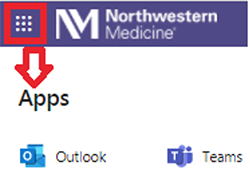
- Applications can be pinned to personalize the App Launcher.
- Resources have been reorganized to remove hospital- and region-specific menus and add some role-specific menus, including the new Physicians menu.
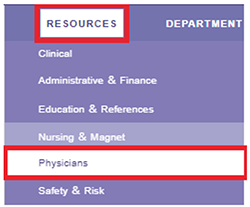
Physician Links are now in Resources
The Physician Links section previously in the left rail on the old NMI site has moved to a new Physicians dropdown under Resources in the top navigation.
Additional support
View the NMI Transition to Microsoft SharePoint Online FAQ document for more information about this transition.
If you encounter any problems with the new NMI site, please submit a service ticket in MyNM Service Center. Or, call 312.926.4357 (6.HELP) and press 0 for NMI support to log your issue.
The Physician Links section previously in the left rail on the old NMI site has moved to a new Physicians dropdown under Resources in the top navigation.
Additional support
View the NMI Transition to Microsoft SharePoint Online FAQ document for more information about this transition.
If you encounter any problems with the new NMI site, please submit a service ticket in MyNM Service Center. Or, call 312.926.4357 (6.HELP) and press 0 for NMI support to log your issue.






© 2024 by Northwestern Medicine® and Northwestern Memorial HealthCare. Northwestern Medicine® is a trademark of Northwestern Memorial HealthCare.

|
Northwestern Memorial
312.926.2000 |
Central DuPage
630.933.1600 |
Lake Forest
847.234.5600 |
Delnor
630.208.3000 |
Kishwaukee
815.756.1521 |
Valley West
815.786.8484 |
Marianjoy
630.909.8000 |
|
©2024 by Northwestern Medicine® and Northwestern Memorial HealthCare. Northwestern Medicine® is a trademark of Northwestern Memorial HealthCare, used by Northwestern University.
|
|